
Open Booking Settings
Go to Settings > Booking. You need permission to edit booking settings to change this page. If the fields are disabled or Save Changes is missing, ask your studio owner to check your access.
These are studio-wide settings for the workflows named below. Class booking cutoffs, private-service advance limits, and credit-return deadlines each control a different part of booking.
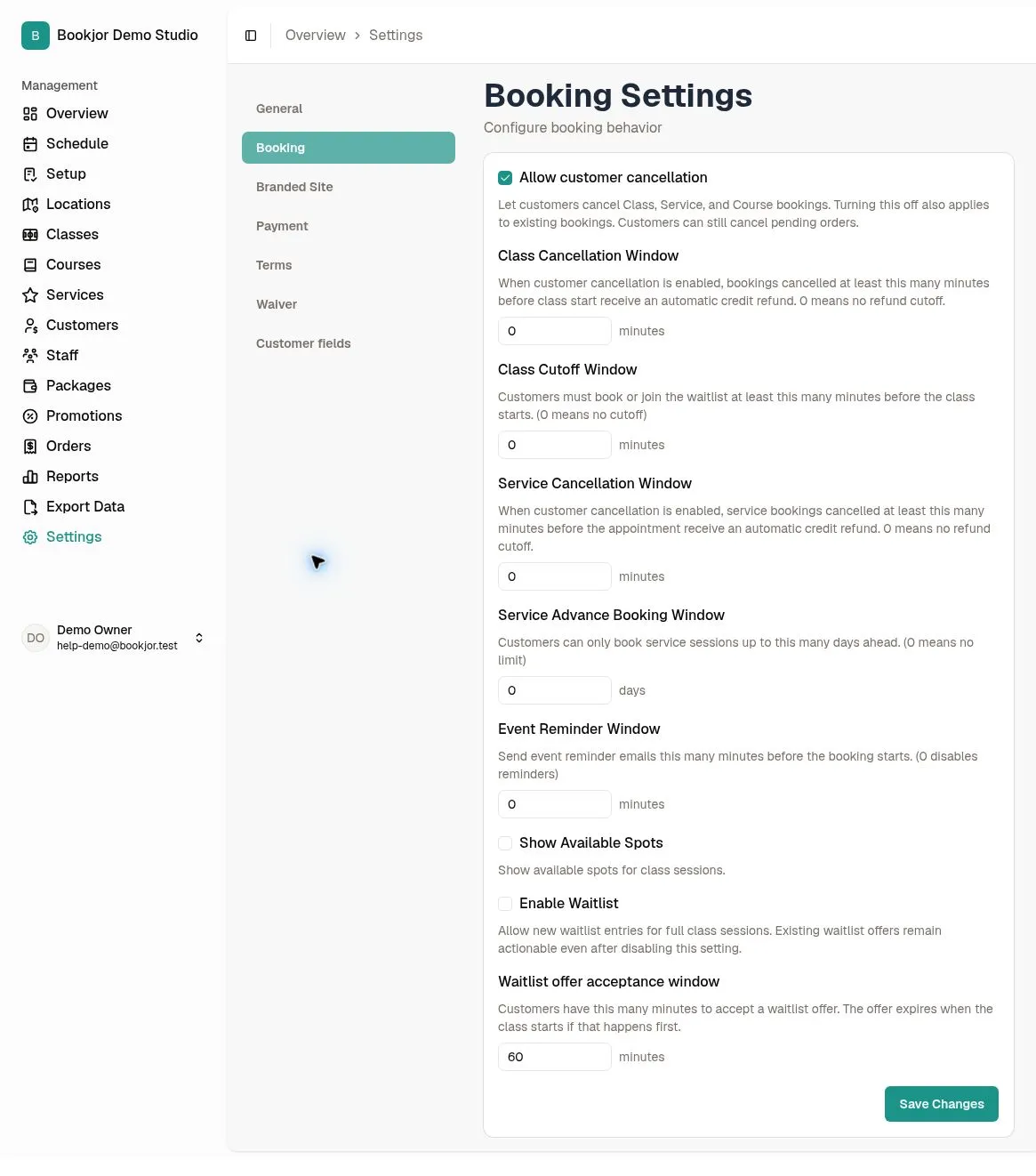
Choose whether customers can cancel
Turn on Allow customer cancellation to let customers cancel Class, Service, and Course bookings themselves. Turning it off also applies to existing bookings.
Customers can still cancel an order whose status is Pending. An unpaid confirmed order is not the same as a pending order. Staff cancellation remains a separate workflow with its own permissions and compensation choices.
Set the class booking cutoff
Enter Class Cutoff Window in whole minutes, from 0 to 10,080. A positive value closes new customer class bookings and waitlist joins that many minutes before the session starts. At the exact cutoff, booking and joining are already closed.
For example, a 60-minute cutoff for a 6:00 pm class closes new customer bookings at 5:00 pm. Enter 0 to disable this extra cutoff; other booking and session restrictions still apply. Staff can enroll customers after this customer cutoff, subject to their normal permissions and booking checks. Already-issued waitlist offers remain subject to their own expiry and the session start.
Limit how far ahead private services can be booked
Enter Service Advance Booking Window in whole days, from 0 to 365. A positive value allows service booking start times through the end of today plus the entered number of calendar days, in your studio’s timezone. For example, if today is October 8 and the value is 7, the latest eligible start is at the end of October 15, rather than exactly 168 hours from now.
Enter 0 for no advance-booking limit. Availability and other booking checks still apply. This field controls private services, not Class or Course enrollment. Shortening this window or changing the class cutoff does not cancel existing bookings.
Set automatic credit-return deadlines
Set Class Cancellation Window and Service Cancellation Window separately, in whole minutes from 0 to 10,080. These fields control automatic return of eligible package credits when a customer cancels; they do not prohibit a later cancellation.
With a positive value, cancel before the deadline to qualify. At the exact deadline or later, the cancellation can still succeed but no automatic package-credit return is made. For a 60-minute window and a 6:00 pm start, cancel before 5:00 pm. Enter 0 for no refund cutoff, subject to the booking’s other cancellation rules.
Only eligible, successful, unrefunded package-credit charges are returned. These settings do not automatically refund card or cash payments. Course withdrawals use their own flow and do not use these Class or Service credit-return windows.
Save and communicate the policy
Review the units and all values, then click Save Changes and wait for the success message. Reopen Booking Settings to check the saved values. If an error appears, correct it before assuming the policy changed.
Current settings are checked when a customer cancels, including for existing bookings. Tell customers when you change your cancellation or credit-return policy. Use the separate staff cancellation guides to choose manual compensation; automatic class cancellation is configured elsewhere.