
Skip to content

Pilates Studio Software

Pilates studio booking software. Every place in view.

Set your reformer class capacity, offer credit packages, and let clients book online. Keep recurring classes and private sessions in one studio calendar.

Free plan: 25 bookings per month, no credit card, no time limit.

Your weekly Pilates schedule

Set up the class once. Give each session the right capacity.

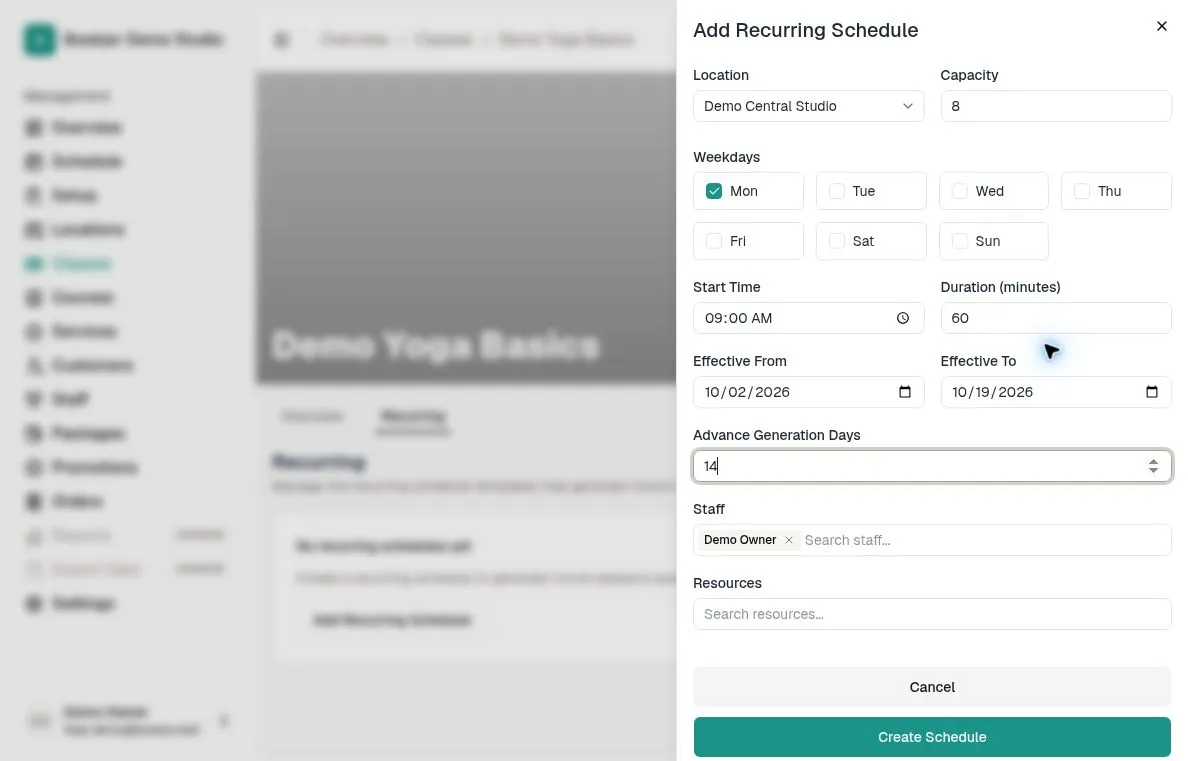
Add recurring reformer or mat sessions with a time, instructor and location. Set capacity to match the places you can offer, and adjust individual sessions when needed.

How recurring schedules work
English Add Recurring Schedule form showing capacity 8, weekday, time, duration, effective dates and staff
Real English product screen: recurring schedule setup in Bookjor Demo Studio. Shown with the sample class Demo Yoga Basics.

Packages and booking

Know which class pack pays for which session.

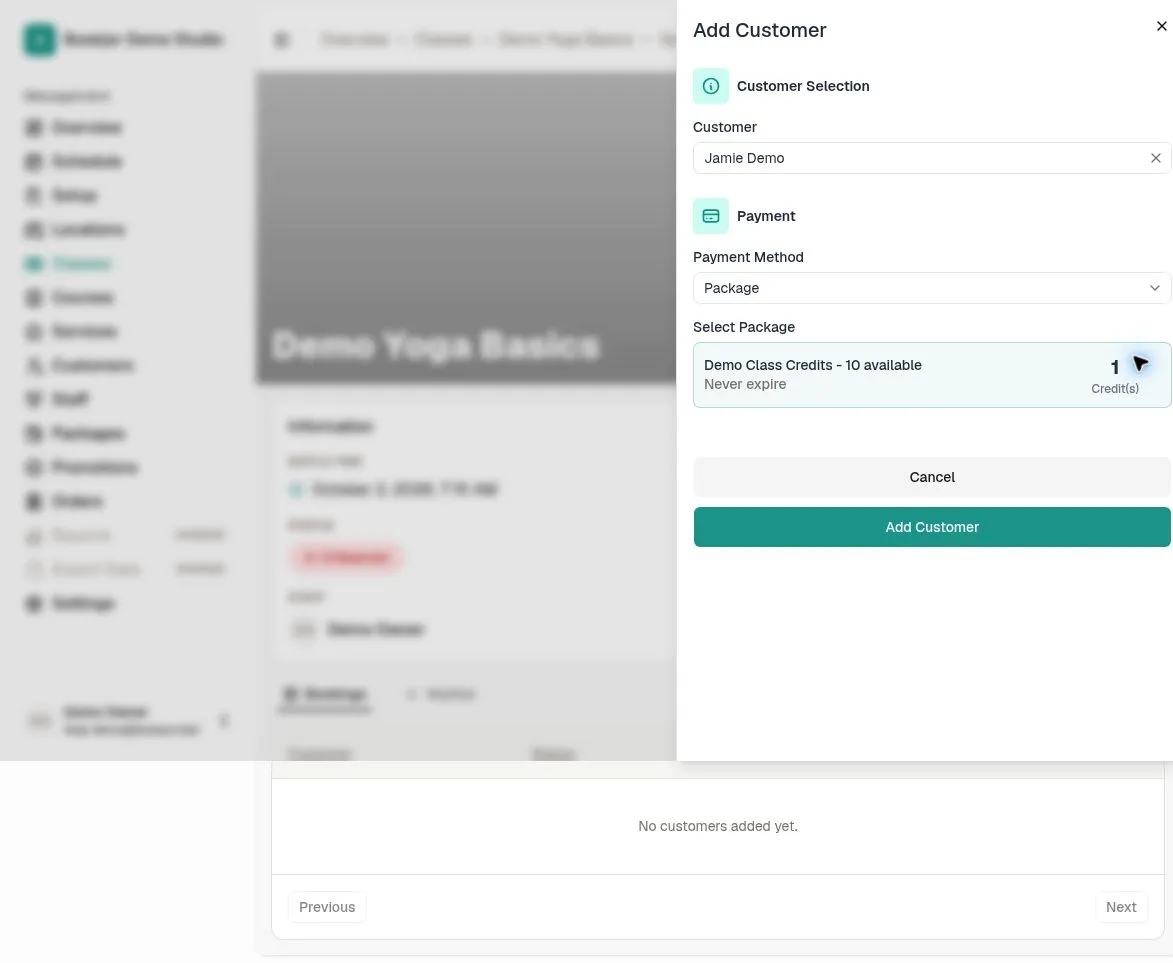
Offer a reformer pack, a mat pack or another package your studio uses. Add accepted packages to each class and set its credit cost. Owning a pack does not make it valid for every session.

  • Clients choose an available payment option when booking.
  • Bookjor checks package eligibility and usable credits.
  • Package start dates and expiry rules also apply to the selected session.
  • Your team can review booking and order status together.

Some payment methods leave a booking pending until payment or proof is processed. Starting checkout is not the same as a confirmed booking.

See package eligibility rules
English staff enrollment form for Jamie Demo showing Demo Class Credits with 10 available and a cost of 1 credit
Staff booking review in the demo workspace: 10 available credits and a 1-credit class cost. This screen shows a review before enrollment, not a completed credit deduction or client checkout.

Cancellations and full classes

Clear rules for the booking changes that happen every week.

Set your booking cutoff, automatic credit-return deadline and waitlist response window in one place.

A cancellation and a credit return are different.

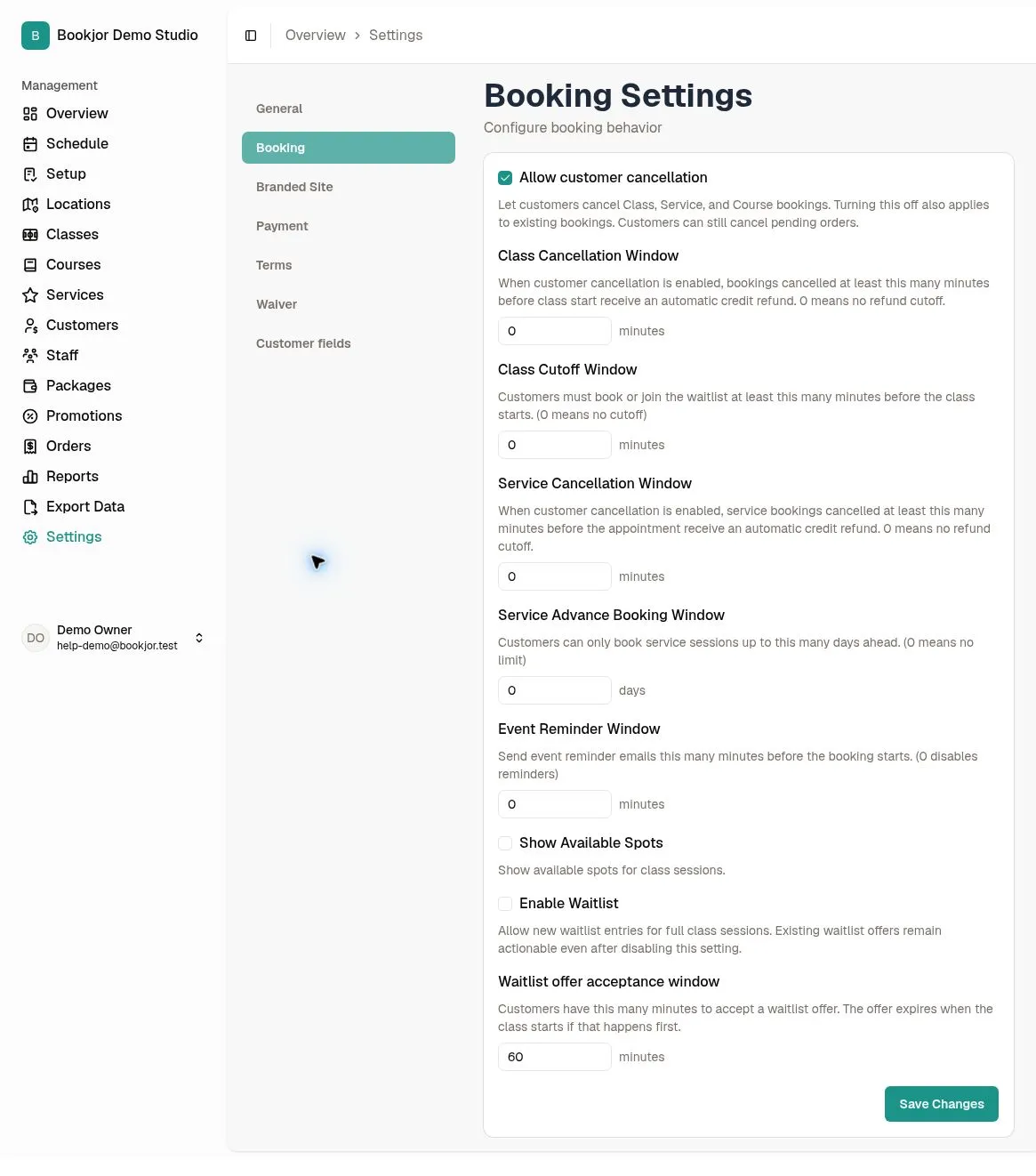
Allow clients to cancel, then choose when eligible package credits return automatically. With a positive cancellation window, cancelling at the deadline or later does not automatically return credits. Card and cash refunds are separate.

Booking and cancellation rules
A waitlist offer still needs a yes.

When a class place becomes available, Bookjor offers it to the next waiting client. They must review and confirm before the offer expires; package eligibility and payment are checked then. Joining a waitlist is not a confirmed booking.

How class waitlists work
English Booking Settings showing customer cancellation, class cutoff, credit-return windows and waitlist offer settings
Demo Booking Settings. The rule windows shown are 0, and Enable Waitlist is off with a 60-minute offer window. These are sample settings, not recommended policies or an active waitlist.

Private Pilates sessions

Offer one-to-one time alongside your group classes.

Create a private service with duration and payment options, then set its availability. Each private booking targets one staff member or one venue. Service options and availability are needed before clients can see bookable times.

Explore private appointments

Start small

Try one class before moving your whole studio.

Add a real class, its capacity and an accepted payment option. Share your booking link, then check the booking and order status. Add the rest of your schedule when the flow works for your team.

Clients can book on your website without downloading an app. Paid plans include the Client App and assisted CSV import of customer records and package balances.

Compare plans from USD 20/month

Stripe processing fees are separate for card payments.

Pilates software guide

FAQ

Pilates studio booking system questions, answered.

Can I limit a reformer class to the machines I have?

Yes. Set the class or session capacity to the number of available reformers. For example, eight usable reformers means setting eight bookable places. This is a class-capacity setting, not automatic tracking of individual machines.

Can clients use a class pack to book Pilates?

Yes. Add the package as an accepted payment method in class pricing and set its credit cost. Clients need an eligible package with enough usable credits for the selected booking. Unlimited passes must also be accepted by the class and follow their validity rules.

Does a cancellation automatically return credits or refund a card payment?

Eligible package credits can be returned automatically according to your Class or Service Cancellation Window. With a positive window, cancellation at the deadline or later can still succeed but does not automatically return credits. These settings do not automatically refund card or cash payments.

Does joining a waitlist confirm a place?

No. Joining does not reserve a confirmed booking or take payment or credits. When a place opens, the next waiting client receives an offer and must review and confirm it before it expires. Package eligibility and any required payment are checked then. Waitlists apply to class sessions, not courses or private services.

Can I offer private Pilates sessions too?

Yes. Create a private service, add a service option with duration and payment options, and set its availability. Each private booking targets one staff member or one venue. Creating the service alone does not create bookable times.

Do clients need to download an app?

No. Clients can browse and book through your booking website. The Bookjor Client App is available on paid plans.

What can I try on the free plan?

The free plan includes 25 bookings per month, with no time limit and no credit card required. Paid plans start at USD 20/month. Stripe processing fees are separate when you accept card payments.

Start free

Start with one real Pilates class.

Try the booking flow with your own schedule and capacity. Free plan: 25 bookings per month, no credit card and no time limit.