
Open Customers
Click Customers in the sidebar. Search by display name before creating another record. The table shows names and avatars; email and phone columns depend on your contact-viewing permission.
Enter the new customer details
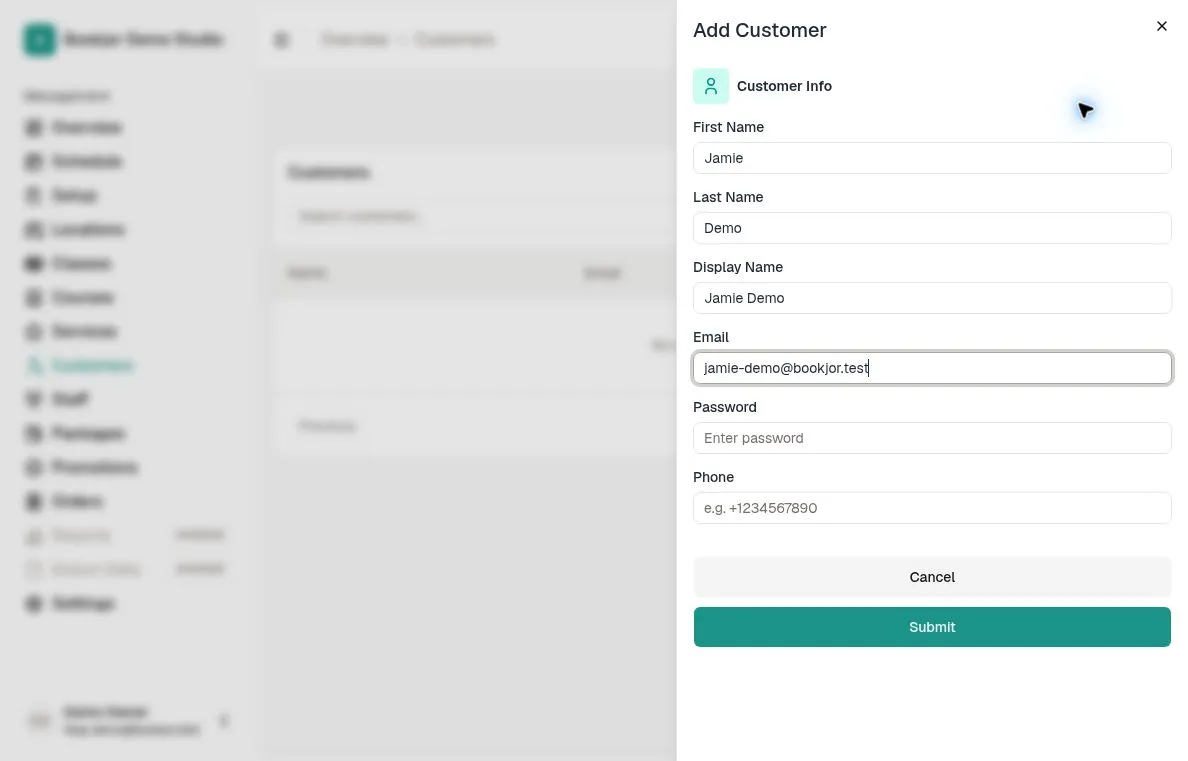
Click Add Customer. Enter First Name, Last Name, Display Name, Email, and a password of 8–72 characters. Use the customer's preferred name for Display Name.
Enter a phone number with its country code, such as +85212345678. Phone is required if Require phone number to register is enabled in Settings > General; otherwise it is optional.
If the email is already in use, creation fails with an error. Check the existing customer record rather than creating a duplicate.
Submit and check the profile
Click Submit and wait for the success message. Bookjor sends a registration welcome email with a link to your customer site; it does not include the password.
Open the new customer profile and use Edit Customer to add gender or date of birth and update other details. Contact fields are available only with the relevant permission.
If the welcome email fails, the customer profile is still created; verify access separately rather than adding the profile again.
Add a family member when appropriate
On Pro or Deluxe, open the primary customer's Family tab and click Add family member. Enter the member's first name, last name, display name, and relationship; date of birth, gender, email, and phone are optional.
Family members are separate attendee profiles managed through the primary customer, rather than new password-based customer accounts. The Family tab shows the current member count and limit.