
Open Add membership for the right customer
New enrollments require Pro or Deluxe. Staff need permission to view and manage memberships and orders, and to view customers.
In the admin sidebar, go to Business → Customers, open the customer's record, select the Memberships tab, and click Add membership. Or go to Business → Memberships, click Add membership, and choose the customer in the sheet.
Choose a plan. If the customer already has an active agreement for that plan, use View membership instead of enrolling them again. A frozen, cancellation-scheduled, or unpaid active agreement still blocks a new enrollment in the same plan. If the existing agreement is pending, choose Continue existing enrollment.
Agree on the monthly fee and choose the first payment
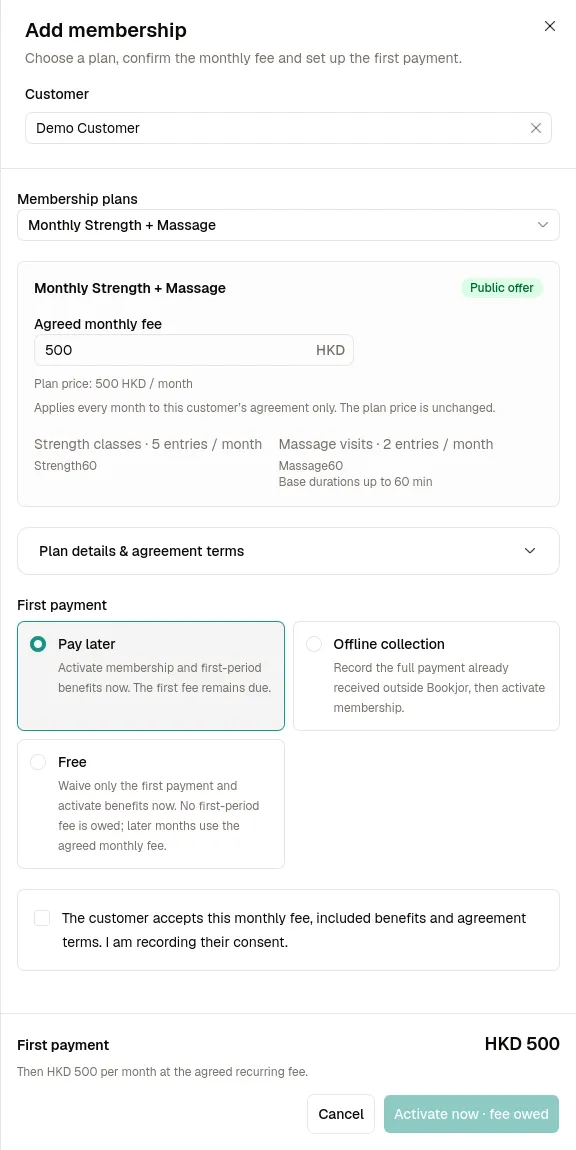
Open Plan details & agreement terms and review the included benefits, minimum commitment, and cancellation terms with the customer. Agreed monthly fee starts at the plan price. Change it only if the customer agrees to a different recurring fee for this membership. Tick the consent checkbox only after they agree to the fee, benefits, and terms.
Pay later → Activate now · fee owed: The membership and first-period benefits start now, but the first fee is still due. Collect it later from the membership’s payment order.
Offline collection → Record payment & activate: Use this only when you have already received the money outside Bookjor. It records the payment and activates the membership; it does not collect money for you.
Free → Activate · first payment waived: Only the first fee is waived. Benefits start now, no first-period balance is due, and renewals still use the agreed monthly fee.
Airwallex appears if your business has configured a payment link. If the first payment is positive, use Continue to secure checkout, attach proof, then select Continue to payment. The membership stays pending until staff verify the payment. Check the first payment separately from the agreed monthly fee: an eligible first-month promotion does not change the recurring fee.
Check the existing membership if activation is pending
If you see Pending activation, or the result of a submission is unclear, first check the customer’s Memberships tab or the Memberships list. Do not create another enrollment for the same plan.
Open the pending agreement and choose Review payment to see its original order. If proof is awaiting review, match the amount and reference against the funds received before accepting it. If Retry initial payment is available, use it on that agreement to continue the original enrollment at its saved amount.