
Open the Stripe status section
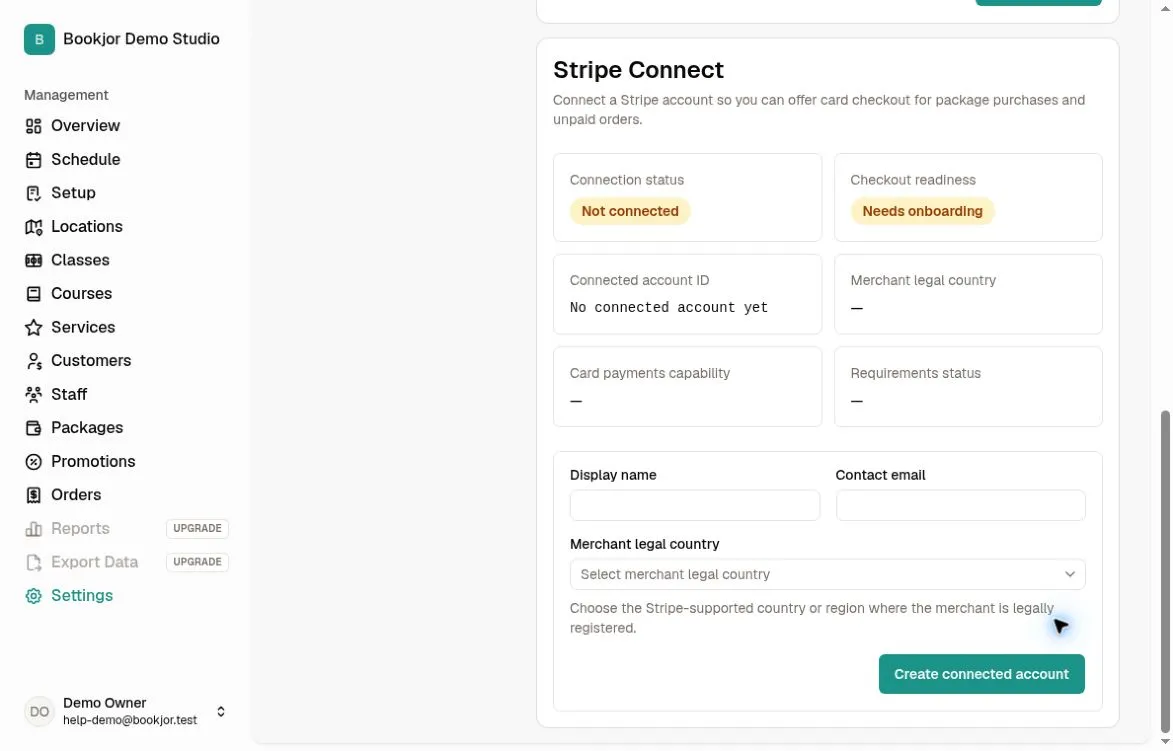
Open Settings > Payment and scroll to Stripe Connect. Only the studio owner can see and manage the Stripe section.
Review Connection status, Checkout readiness, Connected account ID, Merchant legal country, Card payments capability, and Requirements status.
Resolve incomplete onboarding
If Onboard to collect payments is shown, it opens Stripe’s onboarding flow in the same browser tab. Complete the requested steps, then return and refresh Payment settings.
A connected account can still be unable to accept card checkout. If onboarding is complete but the capability is not active, use the displayed requirements and status message to identify what remains.
Manage payouts in Stripe
Bookjor’s Payment page displays Stripe status and offers account creation or onboarding where applicable. It does not provide a payout-account editor, payout schedule controls, or a Stripe Dashboard shortcut.
To change the payout account or check payout timing, open the connected account in Stripe and follow its instructions. Bookjor’s checkout readiness does not indicate when payouts will arrive.
Check before changing accounts
Bookjor has no self-service disconnect or switch-account control on this page. If you need to change the connected account, contact Bookjor support to discuss the available process.
Use Orders to review Bookjor order and transaction records. These are separate from the connected Stripe account’s payout records.